
Getting the white balance right is like finding the sweet spot for natural-looking skies, water, and landscapes in your drone shots. It’s where you kick things off, adjusting color temperature so those blues aren’t too icy and greens don’t scream ‘alien planet’. This technique ensures your backgrounds look just as your eyes remember them.
To tackle white balance, dive into your editing software and start with a temperature slider. Push it warm or cool until things look just right. A little nudge is usually all it takes to transform a photo from bland to breathtaking. Remember, skies are often the trickiest, so pay close attention there.
Exposure correction comes next, and it’s crucial for unveiling those hidden terrain details. Drone shots can sometimes fall flat with shadows swallowing up the good stuff. Bump up that exposure until the picture starts to pop but don’t overdo it. Overexposed skies aren’t a great look.
Contrast might be your new best friend here. It can add that much-needed drama by separating the light and dark areas, giving depth and dimension, especially in aerial shots. Boost it just enough so the details sing without blowing out the highlights. Finding that balance can elevate your shot from mundane to magnificent.
With white balance, exposure, and contrast checked off your list, you’ve laid a solid foundation. The rest of your editing will build on this, enhancing details without masking your beautifully balanced groundwork.
Enhancing Colors with Vibrance, Not Saturation
When it comes to infusing life into your drone photos, reach for vibrance first before saturation. It’s a nifty trick that makes colors pop without crossing into neon territory. Vibrance focuses on the muted tones, subtly enhancing them while keeping the already vivid colors in check.
The magic of vibrance lies in its subtlety. Unlike saturation, which can make your photos look like they’re shouting, vibrance keeps things classy and natural. It’s ideal for shots with lots of varied hues, like a sunset over the ocean or a lush forest landscape.
To get started, look for the vibrance tool in your editing software. Give it a thoughtful tweak instead of a heavy-handed crank. Watch as the scene comes alive with deeper, richer tones that still feel grounded in reality.
Here’s where practice makes perfect. Play around, see how the colors react to different tweaks, and remember: less is often more. If your skies start looking radioactive or the grass turns fluorescent, you’ve probably gone too far.
Vibrance is all about enhancing what’s already there, celebrating the natural beauty of your footage without losing touch with reality. Let your drone shots sing with a little vibrance, keeping them vibrant yet lifelike.
Refining Composition and Horizon Alignment
In drone photography, composition is key to transforming good shots into captivating ones. An off-kilter horizon? It can throw viewers off balance faster than you might think. Straightening that horizon is a straightforward fix that instantly polishes your photo.
Aligning the horizon starts in your editing toolkit. Look for grid lines or alignment tools to guide your adjustments, sliding the photo until it’s perfectly level. It’s a simple adjustment that can make a world of difference in the final presentation.
Once your horizon is sorted, it’s time to revisit composition. The rule of thirds is a classic for a reason. By breaking your image into thirds, both vertically and horizontally, it helps frame your shot in a more engaging way. Placing points of interest along these grid lines turns an ordinary picture into a dynamic story.
Cropping post-shooting helps enhance these compositional elements. Maybe you didn’t get the framing right in the field, or the image needs a tighter focus. Cropping allows you to rework your shot, improving balance and emphasis while keeping the viewer’s attention where you want it.
Tweaking composition and horizon alignment doesn’t just enhance visual appeal—it directs the viewer’s journey through your image, guiding their eyes to focus on the elements that matter most.
Sharpening and Highlight Recovery Strategies
Sharpening can truly bring out textures and details in your drone shots, but it’s all about knowing where to focus your efforts. Buildings and textured areas love a bit of sharpening. It adds crisp lines and definition that make your photos practically leap off the screen.
Too much sharpening, though, and things can start looking unnatural. Clouds and water, with their soft, flowing look, don’t need that hard edge. Over-sharpening these can lead to a noisy or grainy look, which detracts from the image’s natural appeal. Be mindful of where and how much sharpening you apply.
Sky highlights often need recovering, especially when harsh sunlight washes them out. Pulling down highlights can reveal those fluffy clouds that got lost in the brightness. This not only retrieves detail but adds depth and tonality to your sky.
While you’re at it, consider lifting shadows carefully. It’s tempting to yank those shadows up to uncover every hidden nook, but too much transparency can introduce unwanted noise. A delicate lift ensures you highlight ground details while maintaining the overall quality.
Striking the right balance with sharpening and highlight recovery can transform your drone photos. You’re aiming to keep things realistic while showcasing the true beauty of the scene you captured from above.
Crafting the Perfect Mood Through Color Grading
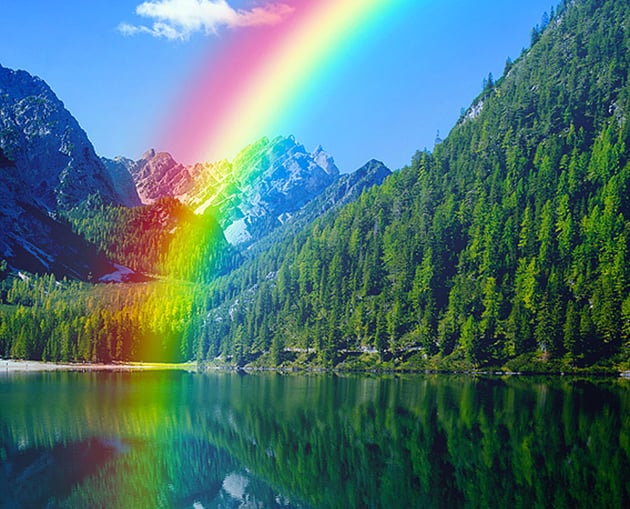
Color grading might just be the secret sauce for your drone photos, setting the tone and overall mood. Whether you’re going for a dramatic sunset vibe or a refreshing coastal coolness, the right color scheme can make your images feel right at home.
When it comes to sunsets, warm tones can bring out those golden hues, casting a soft and inviting glow over everything. Adjust the color sliders towards yellows and reds for that warm, cozy effect that embraces the landscape in a sunset’s glow.
For coastal or marine shots, cool tones can emphasize the calming nature of water. Tweaking the blues and greens subtly adds a crisp, airy feel that perfectly complements the scene.
It’s also worth tidying up the scene by removing distractions. Unwanted items in your shot, like stray cars or random objects, can clutter your image. The clone tool is your friend here, helping you create a clean, uplifting composition by focusing on what truly matters.
Incorporating color grading to evoke the right mood while decluttering your scene ensures your photos convey exactly the narrative you’re aiming for. Every hue and shade contributes to the storytelling power of your images.